
My Account
Basketball Party Text Generator
This two-tool basketball collection separates the jobs a jersey layout usually needs: one generator makes orange ball-texture words, and the other makes outlined black numbers. Use them independently for clear station signs or combine their PNGs in your design for a player name-and-number treatment.
Pick the Element You Need
- Basketball Text Generator: orange #F25A18 lettering with basketball texture, a narrow black edge, and processed surface detail. Use it for a player name, “TIP OFF,” “SNACK COURT,” or an invitation headline.
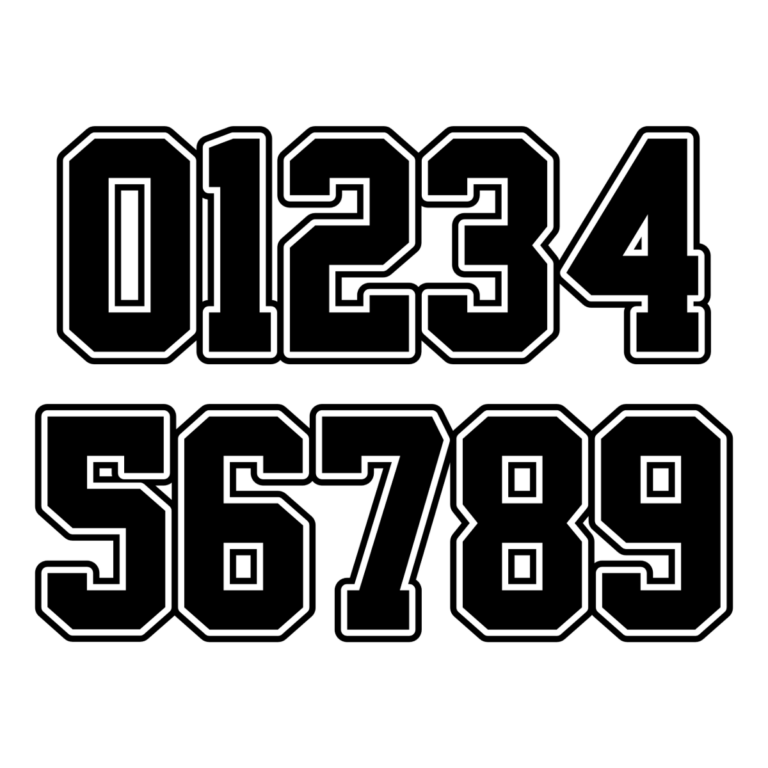
- Basketball Jersey Number Generator: black digits with a slim white inline and black outside outline. Its declared purpose is numbers; the default preview shows 0–9 over two lines. Use it for the birthday age, player number, game score, or court marker.
Choose the text tool when the word itself should look like a ball. Choose the number tool when a digit must resemble a jersey or scoreboard. For a complete player card, generate each part separately so the name, age, and number can be resized without distorting one another.

Party Uses Beyond the Main Banner
Put the orange name at the entrance and repeat it on a cake-table panel or digital reminder. Use jersey numbers on locker-style place cards, team assignments, favor bags, drink markers, or hoop-game stations. A “COURT 1” label can combine ordinary text with one large generated digit, keeping navigation clear.
The orange texture needs enough size to be recognized, so it is strongest on signs and medium labels. Navy, white, light wood, and pale gray backgrounds support the orange face. The black-and-white number can sit on many team colors, but its fine white separator may disappear on white paper or close up on a tiny sticker. Proof the exact destination size.
Assemble a Basketball Set
- Enter one short word in the Basketball Text Generator and proof its texture.
- Create the age or player number in the Jersey Number Generator.
- Download both raster PNGs and align them in your invitation or sign layout.
- Use the same scale and spacing for every player card.
- Leave game directions, times, addresses, and food notes as accessible live text.
The downloads are not installable fonts, vector files, uniform templates, or complete printables. Preserve their aspect ratios and avoid enlarging small exports for a backdrop. Transparency applies to surrounding canvas when a preset background is off; inspect each generated file before handoff.
Common Questions
Can the number tool make a player name?
It is specifically configured for jersey digits. Use the orange Basketball Text Generator or another athletic word style for the name.
Should every guest receive a different number?
That can make place cards and favors easier to match. Choose the roster first, generate each number with identical settings, and keep a simple list for assembly.
What is the easiest collaboration method?
Share separate links for the word and number tools, plus one approved card. Helpers can make additions while keeping the same visual hierarchy.
Return to the Party Text Generator Directory or compare the broader varsity choices in the Baseball collection.

